 Skipper360
Maintenance
Stay ahead of maintenance instead of reacting to it
Marine work comes due by engine hours or by the calendar, whichever arrives first. Skipper360 watches both, so nothing slips.
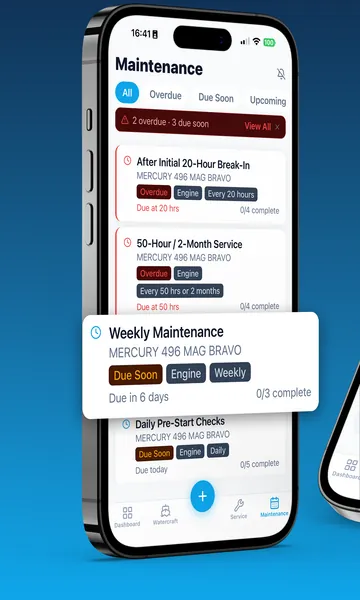
Marine maintenance is unforgiving. Intervals run on engine hours and on the calendar, every engine and system has its own schedule, and the records end up everywhere except where you need them.
Manuals in a drawer, receipts in a folder, intervals in your head, a reminder on a sticky note. Nothing is connected to anything else.
A skipped impeller or an overdue gear-oil change turns into a repair bill — or a season-ending breakdown a long way from the dock.
Every interval means finding the chart in the manual, reading the hour meter, and working out how much running time you have left.
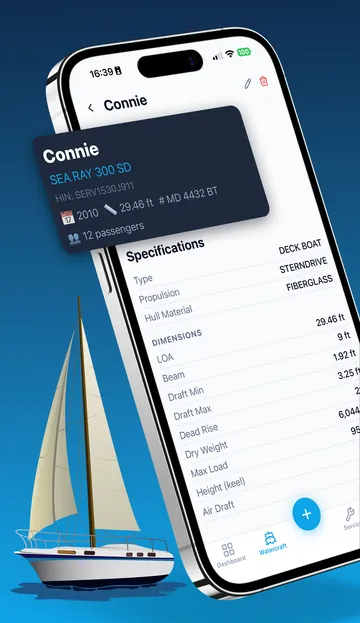
Every watercraft becomes a hub. Equipment, maintenance, engine hours, service visits, manuals, and photos all hang off it — so there is exactly one place to look.
Every watercraft becomes a hub. Equipment, maintenance, engine hours, service visits, manuals, and photos all hang off it — so there is exactly one place to look.
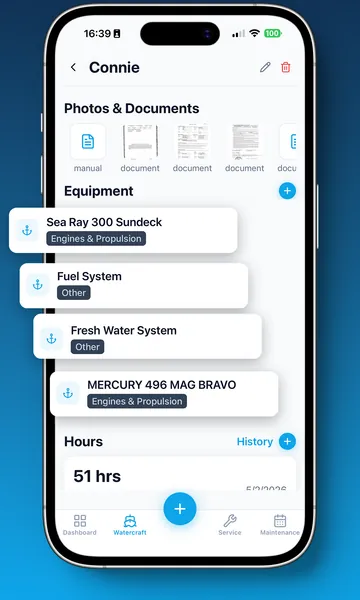
Make, model, year, Hull ID (HIN), registration number, home port, and a full specification sheet — length, beam, draft, dead rise, dry weight, fuel and water capacity, passenger capacity.
Engines, generators, electronics, safety gear, trailers, and more — each in its own category, with the fields that category actually needs.
Schedules that run on engine hours, on the calendar, or on both at once, with checklists and completion history.
Logged at the watercraft or per piece of equipment, feeding straight into what comes due next.
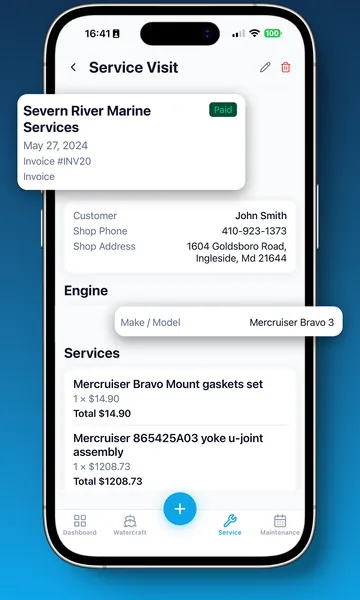
Who did the work, what was replaced, what it cost, how it was paid — with the invoice attached.
Owner's manuals, registrations, receipts, and photos stored against the watercraft or equipment they belong to.
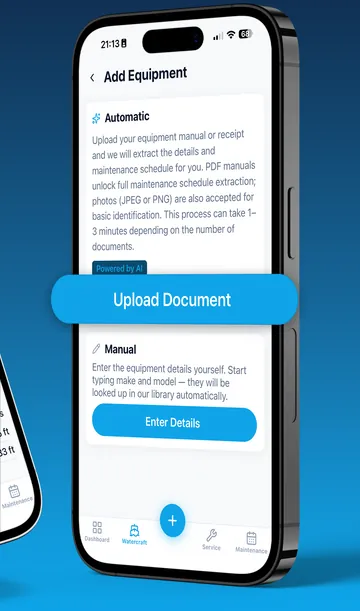
Upload the paperwork you have, or enter make and model so Skipper360 can search public specs. Either way, the result arrives as an editable draft.
Add a PDF manual, registration, bill of sale, licence, or photo — or start from make, model, and optional year when the paperwork is not handy.
Documents are classified and extracted; web searches look for public manufacturer, manual, dealer, or catalogue sources. Repeated lookups are hash-matched when enough fields were found.
Nothing is saved behind your back. Everything arrives as a draft you review and edit before it becomes part of your records.
Approved tasks become live maintenance schedules, tied to the right equipment, counting down in hours and months from that moment.
Atlas-assisted setup is part of Pro and Captain — and your very first watercraft can be set up with it before you pay anything.
Atlas extraction and web search can make mistakes. You review every task and specification before it is saved, and you should always confirm maintenance requirements against the manufacturer's documentation.
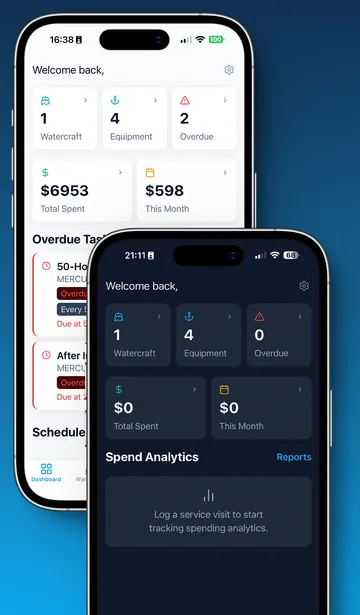
No digging. One screen answers what needs doing, what it has cost you, and what happened recently.
Maintenance
Marine work comes due by engine hours or by the calendar, whichever arrives first. Skipper360 watches both, so nothing slips.
Equipment
A boat is not one machine. Skipper360 treats each engine, generator, plotter, and trailer as its own record — with its own hours, its own documents, and its own maintenance.
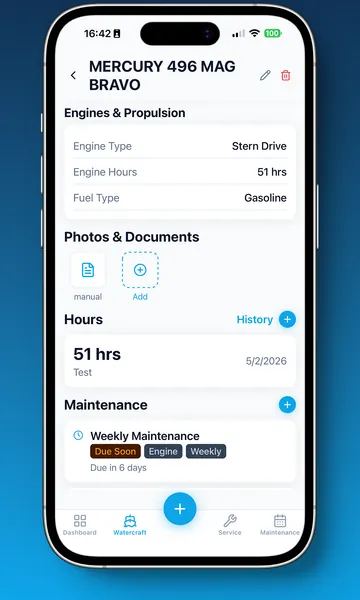
Engine hours
An hour meter reading on its own is trivia. Connected to your maintenance schedule, it is the difference between planned work and an unplanned tow.
Service history
The maintenance history is what a warranty claim needs, what a buyer asks for, and what tells the next mechanic what has already been tried.
Manuals, registrations, insurance paperwork, invoices, and photos live with the watercraft or equipment they belong to — and are with you at the dock.
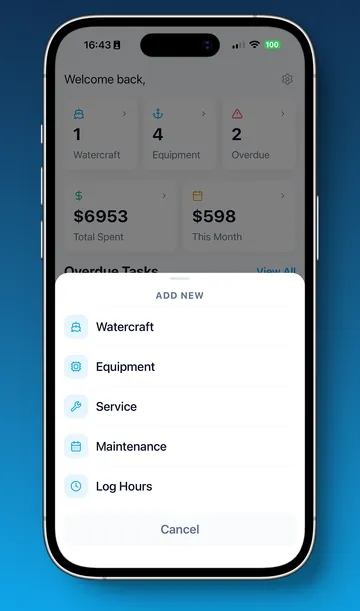
The parts that don't fit on a feature list but decide whether an app gets used in year two.
A cruiser, a PWC, and the trailer that hauls it — all tracked separately, all on one dashboard.
Enter your email, get a one-time code, and you're in. No password to forget or reuse.
Re-open Skipper360 with Face ID, a fingerprint, or your device passcode instead of waiting for a code.
The whole app — and this site — in your language, picked up from your device automatically.
Follow your device, or lock it to light or dark. Dark mode is genuinely readable in a dim cabin.
Switch units to match the way you actually talk about your boat.
Notifications on your device before maintenance comes due, not just a badge you never look at.
Onboarding walks you through your first watercraft, and the app tour can be replayed any time from Settings.
Delete your account and everything belonging to it from inside the app — no email request, no waiting.
Most boat owners already have a system. It is usually a drawer, a folder, a spreadsheet, and a good memory. Here is what changes.
| Manuals, folders & spreadsheets | Skipper360 | |
|---|---|---|
| Watercraft details and specifications | Spread across the registration, the manual, and memory | One record with HIN, registration, home port, and full specs |
| Equipment records | A note per item, if it was written down at all | Each item categorised and linked to its watercraft |
| Owner's manuals | A drawer, a downloads folder, or a web search on the dock | Stored against the equipment they document |
| Finding maintenance intervals | Read the manual and copy the chart out by hand | Atlas-assisted extraction, reviewed by you |
| Building maintenance schedules | Create and maintain every entry yourself | Built from the manual, or entered manually — your choice |
| Engine hours | A separate note that nothing else reads | Connected to every hour-based task |
| Knowing what's due soon | Work it out yourself, each time | Calculated continuously and surfaced for you |
| Catching what's overdue | Easy to miss until something fails | Flagged on the dashboard and in the task list |
| Reminders | A calendar entry you remembered to create | Device notifications before a task comes due |
| Service history | Receipts, emails, and the marina's records | One history with costs, providers, and attachments |
| Logging a service invoice | Type it in, or file the paper and hope | Extracted from the invoice and matched to open tasks |
| Documents and photos | Camera roll, email, cloud drive, glovebox | Attached to the record they belong to |
| Running several watercraft | The complexity multiplies with every boat | Designed for a fleet from the first screen |
| Answering what the boat has cost | Add receipts by hand, then wonder what is missing | Cost, equipment health, maintenance status, fleet, and hours reports from the records you already keep |
| Checking records away from your phone | Wait until you have the right device with you | The same reports, filters, exports, history, and language support in the web app |
| Proving history when you sell | Reconstruct years of work from memory | A complete record you can export, email, and download again on Captain |
Every paid plan includes a one-month free trial. You are charged only when the trial ends, and you can cancel any time before it does.
Get organised
$0 forever
No credit card required
For the serious owner
$6.99 / month
or $49.99/year ($4.17/mo)
1-month free trial
For the whole fleet
$9.99 / month
or $79.99/year ($6.67/mo)
1-month free trial
Prices shown in US dollars and may vary by region. Subscriptions are billed through your App Store account; the final price, renewal terms, and trial eligibility are always shown at checkout. See the Terms of Use for plan and billing details.
Recreational watercraft — powerboats, sailboats, and personal watercraft — along with the equipment on board. Engines, generators, electrical and navigation systems, safety gear, trailers, and accessories are all tracked by category.
It can classify uploaded documents, extract maintenance schedules and vessel details, or search public web sources from make, model, and optional year. Everything arrives as a draft you review and edit before it is saved. Atlas output can make mistakes, so always verify against manufacturer documentation.
Yes. Every screen supports manual entry, and manual entry is available on every plan including Free. The Atlas is a shortcut, not a requirement.
Skipper360 works out when each task is due from your logged engine hours and from the calendar, then sends reminders through notifications on your device. Reminders are an organisational aid — always confirm maintenance requirements against your manufacturer's documentation.
Your watercraft, maintenance records, and uploaded documents are private to your account and stored securely. Skipper360 Atlas processes documents to extract maintenance information for you, and can look up public sources from make, model, and year when you choose that setup path. Official manufacturer manuals — and only those — are shared so other owners of the same equipment benefit. Our Privacy Policy has the full detail.
Pro and Captain each include a one-month free trial through the App Store. You are charged when the trial ends unless you cancel before then, and you manage the subscription in your App Store settings. Trial eligibility is determined by the App Store.
Plans have different limits on watercraft, equipment, and service records. If you downgrade past those limits, Skipper360 shows you exactly which records exceed the new plan before anything is removed, so there are no surprises.
Passwordless: enter your email, receive a one-time code, and you're in. After that you can unlock the app with Face ID, a fingerprint, or your device passcode.
The app is fully available in English, Spanish, and French, and picks up your device language automatically. You can change it any time in Settings.
Skipper360 is available for iPhone and iPad on the App Store, and signed-in customers can use the web app when they want the same records and reports on a larger screen.
Set up your watercraft from a document or web search, review the draft, and let the schedule build itself. The next time something is due, you'll already know.
Free to start · 1-month free trial on Pro and Captain · Cancel anytime